
Football Shot Maps Explained: How to Read Them Like an Analyst
Football shot maps visualise every shot in a match or season — distance, angle, xG, body part, outcome. We break down how to read them and what they reveal.
 Tap to enlarge
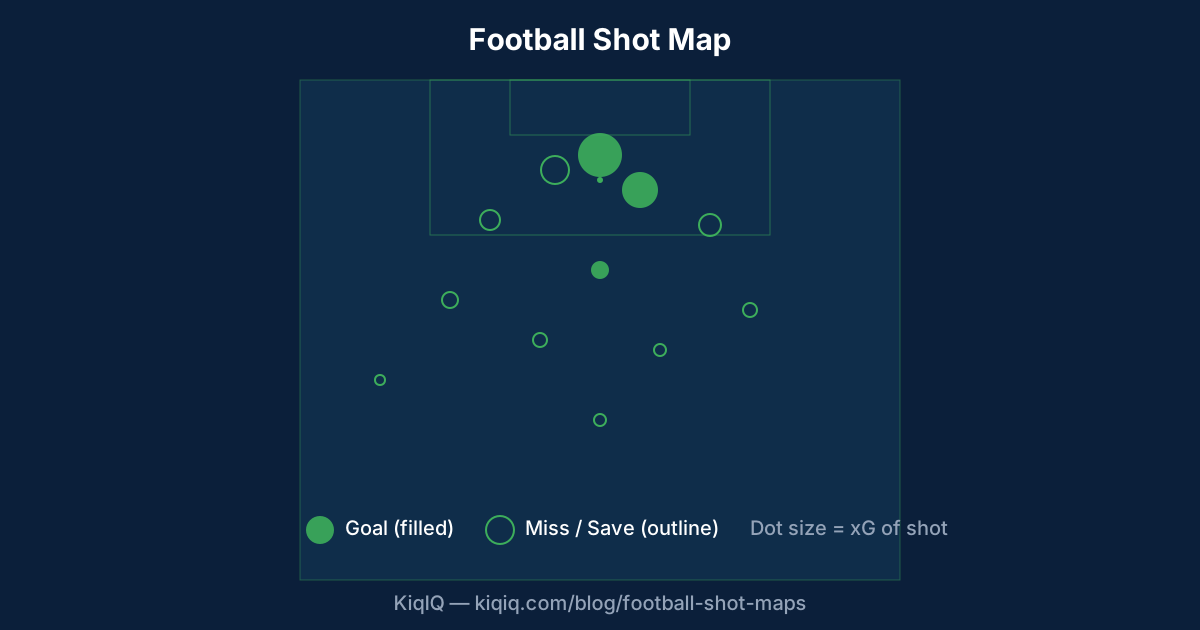
A football shot map is a half-pitch diagram showing every shot taken by a team or player, with each dot positioned at the shot location and sized by expected goals (xG). Goals are usually filled, misses outlined. Shot maps reveal where a team or player attacks from, how good their chances were, and whether they are over- or under-finishing.
What does a shot map show?
A standard shot map plots every shot from one half of the pitch — the attacking half — with dots positioned at the exact shot coordinates. Each dot encodes three pieces of information: location (where the shot was taken from), size (xG value of the shot), and fill state (goal vs miss vs save).
Some shot maps add colour or shape encodings for body part (foot vs head), assist type (open play, set piece, penalty), or game state. The most readable maps stick to size + fill, with body part as a shape distinction.
How to read distance and angle
Shots clustered near the penalty spot are high-xG opportunities. Shots from the edge of the box at narrow angles are low-xG. Shots from outside the box are nearly always low-xG, regardless of player.
A team whose shot map clusters in the centre of the box is generating high-quality chances; a team whose shots are spread to the wings and edge is settling for low-percentage attempts. The latter pattern is common against deep-block defences.
- Penalty spot ≈ 0.76 xG (penalties)
- 6-yard box ≈ 0.30–0.50 xG
- Edge of penalty area ≈ 0.05–0.10 xG
- Outside the box ≈ 0.02–0.04 xG
- Tight angles near the byline ≈ 0.02 xG (regardless of distance)
Goals vs xG: what the dots tell you
When you sum the xG of all shots, you get the total xG. Compare that to actual goals scored:
Goals = xG: average finishing.
Goals > xG: overperformance — either a hot streak (variance) or genuine finishing skill (skill).
Goals < xG: underperformance — bad luck or poor finishing. Over a few games this is noise; over a full season it is signal.
A shot map tells you where chances came from. The xG total tells you how good those chances were. The goal count tells you whether finishing was average, lucky, or unlucky.
Shot maps for players vs teams
A team shot map aggregates every shot in a match or season. It reveals attacking patterns: do they create from the half-spaces (Manchester City), down the wings (Liverpool of the Klopp era), or from set pieces (Brentford, Iceland NT)?
A player shot map reveals shot diet — where this player likes to shoot from. A high-volume striker like Erling Haaland will show heavy clustering in the central penalty area. A creator like Bruno Fernandes shows scattered shots from outside the box.
Common reading mistakes
A shot map is a distribution, not a verdict. Three pitfalls:
- 1. One match is a small sample. A team can have a 3.0 xG match and lose 0–1 — entirely normal. Aggregate over 5–10 games before drawing conclusions.
- 2. xG underweights some shot types. Long-range strikers, header specialists, and set-piece takers can systematically beat xG. Read the map alongside the player.
- 3. Position is not the only input. xG models also use body part, assist type, and goalkeeper position (in xGOT models). Two shots from the same dot location can have very different xG values.
Where to find shot maps
StatsBomb publishes free shot maps for top European leagues with visible xG values. Understat is the easiest free source for full-season shot maps for the top 5 leagues. FBref combines the two with embedded shot tables.
On KiqIQ, every fixture page surfaces an in-built shot map for the match once full-time data is available, alongside the team's xG totals.
Frequently asked questions
- What does each dot on a shot map represent?
- Each dot represents one shot. The position is where the shot was taken from, the size encodes the xG value (bigger = higher chance), and the fill state shows whether the shot was a goal (filled), saved, blocked, or missed (outlined or coloured differently).
- How is xG shown on a shot map?
- xG is encoded as the dot size — the larger the dot, the higher the xG of that shot. Some shot maps also colour-code by xG value or list the total xG in a corner. Total xG is the sum of every dot on the map.
- Where can I find free football shot maps?
- Understat (Premier League, La Liga, Serie A, Bundesliga, Ligue 1) and FBref offer free shot maps with xG values. StatsBomb publishes free women's World Cup shot maps with full coordinate data. Sofascore and Fotmob include shot maps in their match views.
- What does a "good" team shot map look like?
- A good shot map shows clustering in central areas of the penalty box (high-xG zones), few low-percentage long-range attempts, and a healthy mix of left-foot, right-foot, and headed shots. The total xG is high — and ideally the goal count matches or exceeds it.
References
- Shot Maps and xG Visualisation — StatsBomb
- Understat — Shot Maps — Understat
- FBref — xG Maps — FBref
- Football Shot Maps in Python (mplsoccer) — mplsoccer
Key terms in this article
Ask KiqIQ a follow-up
Get a live, data-driven answer powered by api-football + KiqIQ's Poisson model. Try one of these prompts or write your own.
Try the calculators
Apply the concepts from this article with KiqIQ's free calculators.
Part of pillar
Data and Systems
See every article in this knowledge pillar →
Related
Reviewed by a KiqIQ editor before publication. Spotted an error? Email editor@kiqiq.com — we follow our Corrections Policy.