
Football Pass Maps Explained: Network, Sonar, and Receiver Maps
Football pass maps come in three flavours: pass network (team shape), pass sonar (direction tendencies), and receiver map (where a player gets the ball). We explain each.
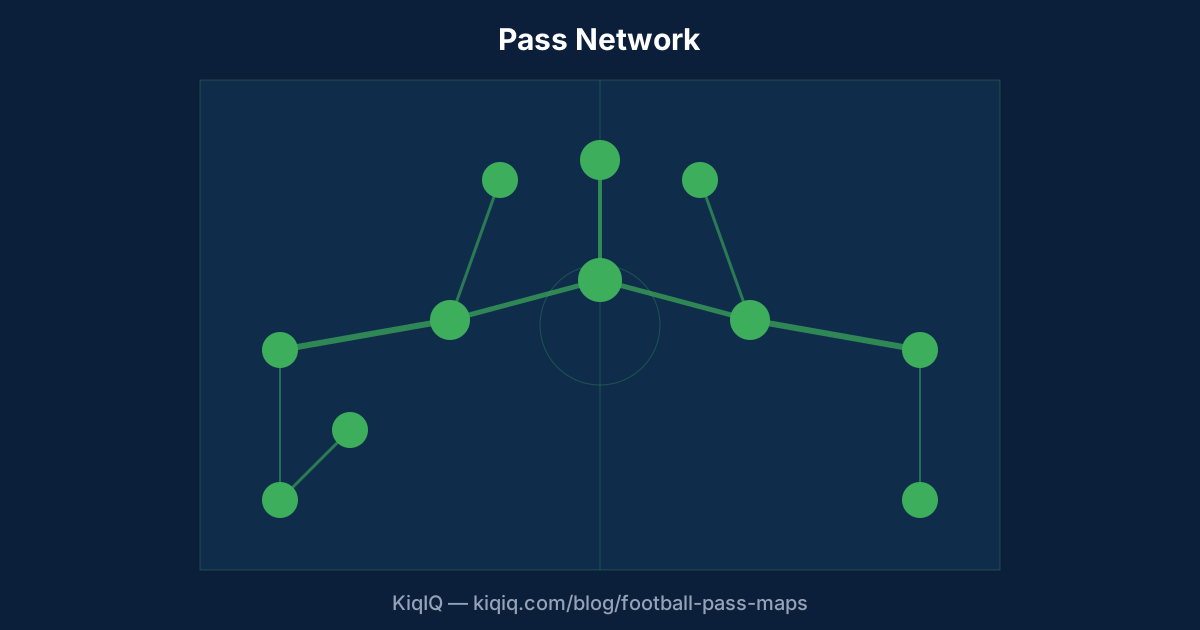 Tap to enlarge
A football pass map visualises pass data on the pitch. The three most useful types are the pass network (showing team shape and ball-circulation routes), the pass sonar (each player's direction and length tendencies), and the receiver map (where a player picks up the ball most often). Each tells you something different.
Type 1: the pass network
A pass network places each starting XI player at their average position on the pitch and draws lines between pairs of players that completed at least a threshold number of passes (typically ≥ 3). The thickness of each line is proportional to pass volume.
Pass networks reveal team shape under load — not the formation on paper, but the formation in possession. Manchester City's pass network typically shows their fullbacks tucked inside as inverted full-backs; Liverpool's shows their midfielders pulled wide; a low-block side will show a compressed network with most lines clustering deep.
Limitations: pass networks only count completed passes between starting XI before the first substitution. They underweight goalkeepers and ignore subs. They average position over the time window, smoothing through tactical changes within the half.
Type 2: the pass sonar
A pass sonar (sometimes called a "Pizza chart" or "passing rose") shows one player's pass tendencies as a polar histogram. Each angular bin represents a direction; the radius represents pass volume in that direction; colour can encode average pass length.
Sonars reveal directional preferences. A holding midfielder like Rodri shows a tight, omni-directional sonar — he passes in every direction. A traditional left-back shows a sonar dominated by forward and inside-forward bins. A creative #10 shows asymmetric sonars based on which channel they prefer to feed.
Sonars are the cleanest way to compare passers. Two players with identical pass volumes can have radically different sonars — a 70-pass-per-game holding mid playing safe vs a 70-pass-per-game progressive #6 hitting line-breaking balls.
Pass network = team shape. Pass sonar = individual passing style. Receiver map = where a player gets touched in.
Type 3: the receiver map
A receiver map plots every location where a chosen player received a successful pass. Dots represent receiving locations; density tells you the player's ball-receiving zone.
Receiver maps are essential for understanding strikers and creators. A striker's receiver map tells you whether they're dropping deep (Harry Kane, Lautaro Martínez), playing on the shoulder (Erling Haaland), or drifting wide (Mohamed Salah, Vinicius Júnior). A creator's receiver map tells you whether they prefer the half-spaces, the channels, or central pockets.
Progressive pass maps
A progressive pass is one that moves the ball significantly toward the opponent's goal — the most common definition is a pass advancing the ball at least 25% of the distance to goal in the attacking half (Opta), or one moving the ball at least 10 metres closer to goal (other providers).
A progressive pass map filters a player's passes to only the progressive ones, plotted with start and end coordinates and arrows. The result is a striking visualisation of who breaks lines and from where. Top-tier deep playmakers like Toni Kroos, Joshua Kimmich, and Granit Xhaka show dense forward arrows from their own half.
How to use pass maps in analysis
For team analysis: read the pass network first. Look for inverted full-backs, missing midfielders pulled to one side, or a striker disconnected from the rest of the team (an isolated front node usually indicates either a long-ball strategy or a possession problem).
For player analysis: pair the sonar with the receiver map. The sonar tells you what they do with the ball; the receiver map tells you where they get the ball. Together they describe the player's on-ball role.
For opposition scouting: look at the network under high press conditions vs settled play. Many sides shift radically depending on whether they are pressed or allowed to build.
Tools for building pass maps
mplsoccer is the open-source Python library for plotting pass maps. It uses StatsBomb's open data (free for women's World Cups and selected men's competitions) and works with private Opta and StatsBomb feeds.
Public-facing analytics from The Athletic, The Analyst (Opta), and StatsBomb all use these conventions. The Athletic's tactical column publishes pass networks weekly during the European season.
Frequently asked questions
- What is a pass network in football?
- A pass network is a top-down pitch diagram showing each starting XI player at their average position, connected by lines whose thickness reflects pass volume between pairs. It reveals a team's in-possession shape, ball-circulation patterns, and which players are most central to build-up.
- What does a pass sonar show?
- A pass sonar is a polar chart for one player. Each angular bin is a passing direction; bin length encodes pass volume; colour can encode pass length. It reveals directional and length preferences — whether a player passes mostly forward, sideways, or backwards, and at what distances.
- What is a progressive pass?
- A progressive pass moves the ball significantly toward the opponent's goal. The most common Opta definition is a pass that advances the ball at least 25% of the distance from start point to opposition goal in the attacking half (or 10m closer to goal under other providers).
- How do I read a receiver map?
- A receiver map plots every successful pass-reception location for one player. Dense clusters reveal where the player picks up the ball most often. For strikers it shows whether they drop deep or stay high; for creators it shows preferred half-spaces or channels.
References
- Visualizing Pass Networks — StatsBomb
- Opta — Progressive Pass Definition — Opta
- mplsoccer documentation — mplsoccer
- Pass Sonars Explained — Karun Singh
Key terms in this article
Ask KiqIQ a follow-up
Get a live, data-driven answer powered by api-football + KiqIQ's Poisson model. Try one of these prompts or write your own.
Try the calculators
Apply the concepts from this article with KiqIQ's free calculators.
Part of pillar
Data and Systems
See every article in this knowledge pillar →
Related
Reviewed by a KiqIQ editor before publication. Spotted an error? Email editor@kiqiq.com — we follow our Corrections Policy.