
mplsoccer: The Python Library That Powers Football Visualisations
mplsoccer is the open-source Python library powering most football visualisations on Twitter, Reddit, and analyst blogs. We explain what it does, who built it, and how to start using it.
 Tap to enlarge
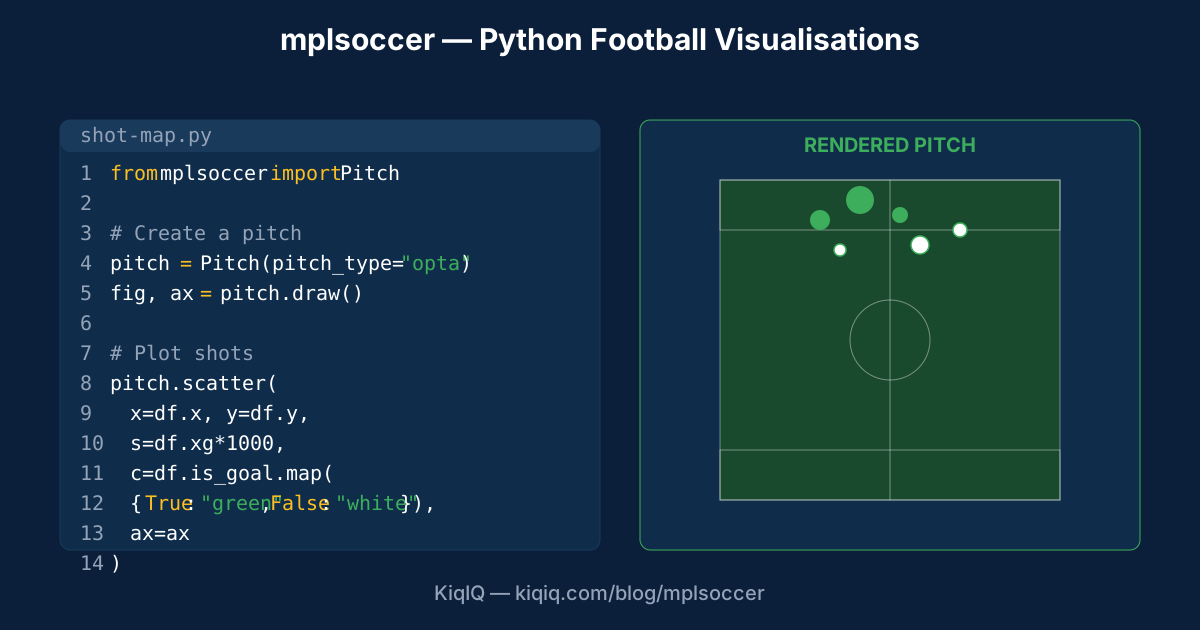
mplsoccer is the open-source Python library powering most football pitch-based visualisations on Twitter, Reddit, analyst blogs, and academic papers. Built by Andrew Rowlinson on top of matplotlib, it provides one-line APIs for drawing pitches, plotting shot maps, pass networks, heatmaps, and tactical diagrams. It's free, well-documented, and used by analysts, students, journalists, and amateur enthusiasts globally.
What mplsoccer does
Five core capabilities make mplsoccer the standard for football data visualisation:
- Pitch drawing. A single Python function call renders a regulation football pitch with all markings (penalty area, centre circle, etc.). Multiple pitch styles available (Opta, StatsBomb, Wyscout, generic).
- Shot map plotting. `pitch.scatter()` plots shots with size = xG, fill = goal/no-goal. The standard analyst output.
- Pass network rendering. Position-based player nodes with passing volumes as edges between them.
- Heatmap rendering. 2D density plots showing player or team positional concentration.
- Tactical diagram drawing. Arrows, zones, formation overlays — all with mplsoccer's pitch coordinate system.
Most football pitch images on Twitter or Reddit analyst threads were rendered with mplsoccer. Once you know the visual style, you spot it everywhere.
Why it became the standard
Three reasons mplsoccer dominated:
- Open source + free. No subscription, no paywall. Anyone with Python can use it.
- Multiple coordinate systems supported. Opta, StatsBomb, Wyscout all use slightly different x/y coordinate systems. mplsoccer translates between them.
- Excellent documentation. Andrew Rowlinson wrote extensive worked examples and tutorials. Lower learning curve than rolling your own matplotlib code.
- Community contributions. Many features added by users via GitHub pull requests over the years.
How to use it
A typical mplsoccer workflow:
- Install: `pip install mplsoccer`.
- Import: `from mplsoccer import Pitch`.
- Create a pitch: `pitch = Pitch(pitch_type="opta", pitch_color="grass")`.
- Draw it: `fig, ax = pitch.draw()`.
- Add data: `pitch.scatter(x, y, ax=ax, s=xg_sizes, c=colors)` for a shot map.
- Save: `fig.savefig("shot-map.png", dpi=300)`.
StatsBomb open data integration
mplsoccer integrates seamlessly with StatsBomb's open-data project — free downloadable event data for women's World Cups and selected men's competitions. The combination is powerful:
- Download a match's event data via StatsBomb's open API or git repository.
- Filter to shots, passes, or other event types.
- Pass directly to mplsoccer's plotting functions.
- Render publication-quality visualisations in 30-50 lines of code.
Who uses mplsoccer
Five user communities:
- Football analysts on Twitter. The vast majority of analyst Twitter pitch-based content uses mplsoccer.
- Academic researchers. Soccer-analytics academic papers commonly cite mplsoccer in methods sections.
- Bloggers + journalists. Free tier of football analytics — what you see on The Analyst is paid commercial; what you see on amateur blogs is mplsoccer.
- Students learning analytics. mplsoccer is the standard intro-to-football-analytics teaching tool.
- Some clubs. Some clubs use mplsoccer for internal reports; most prefer paid tools but open-source is no longer rare in pro clubs.
Limitations
Three things mplsoccer doesn't do:
- Live in-match plotting. mplsoccer renders static images. For live updates, separate frameworks (Plotly, D3) are needed.
- 3D visualisations. Pitch is 2D. For tracking-data flythrough or 3D visualisation, separate tools required.
- Interactive web plots. Output is image files; for interactive web visualisations, the user must build their own front-end on top of mplsoccer's plotting.
Alternative libraries
mplsoccer dominates but has competitors:
- socceraction. Python package for VAEP and related advanced metrics; less plotting, more metrics.
- Soccermatics. A coursebook + library by David Sumpter; more academic-flavoured.
- Pitch.js (JavaScript). Web-native pitch rendering for interactive applications.
- Custom matplotlib. Some analysts roll their own pure matplotlib code; mplsoccer is essentially a wrapper that saves time.
Frequently asked questions
- What is mplsoccer?
- mplsoccer is an open-source Python library for football pitch-based data visualisations. Built on top of matplotlib by Andrew Rowlinson. Provides one-line APIs for drawing pitches, plotting shot maps, pass networks, heatmaps, and tactical diagrams. Used by most football analysts on Twitter, Reddit, and analyst blogs. Free and well-documented.
- How do I install mplsoccer?
- `pip install mplsoccer` from the Python package index. The library has minimal dependencies (matplotlib, numpy, pandas) and works on Python 3.7+. After installation, `from mplsoccer import Pitch` exposes the main API. The official documentation has extensive worked examples for shot maps, pass networks, and other common visualisations.
- Is mplsoccer free?
- Yes. mplsoccer is open-source and released under the MIT licence. No subscription, no paywall, no commercial restrictions. Pair it with StatsBomb open data (also free for women's World Cups and selected men's competitions) for a complete free analytics setup.
- Who is mplsoccer for?
- Anyone who can write basic Python. Football analysts on Twitter, students learning analytics, academic researchers, bloggers, journalists, and an increasing number of pro clubs use it. The learning curve is lower than rolling your own matplotlib pitch-drawing code, but does require comfort with Python and pandas DataFrames.
References
- mplsoccer — Official Documentation — mplsoccer
- mplsoccer — GitHub Repository — GitHub
- StatsBomb Open Data — StatsBomb
- Soccermatics — David Sumpter — Soccermatics
Key terms in this article
Ask KiqIQ a follow-up
Get a live, data-driven answer powered by api-football + KiqIQ's Poisson model. Try one of these prompts or write your own.
Part of pillar
Data and Systems
See every article in this knowledge pillar →
Related
Reviewed by a KiqIQ editor before publication. Spotted an error? Email editor@kiqiq.com — we follow our Corrections Policy.